US DUAL PRICING PROGRAM
Clearly display your cash and card prices before checkout. Let your customers choose their payment method while you eliminate costly merchant processing fees
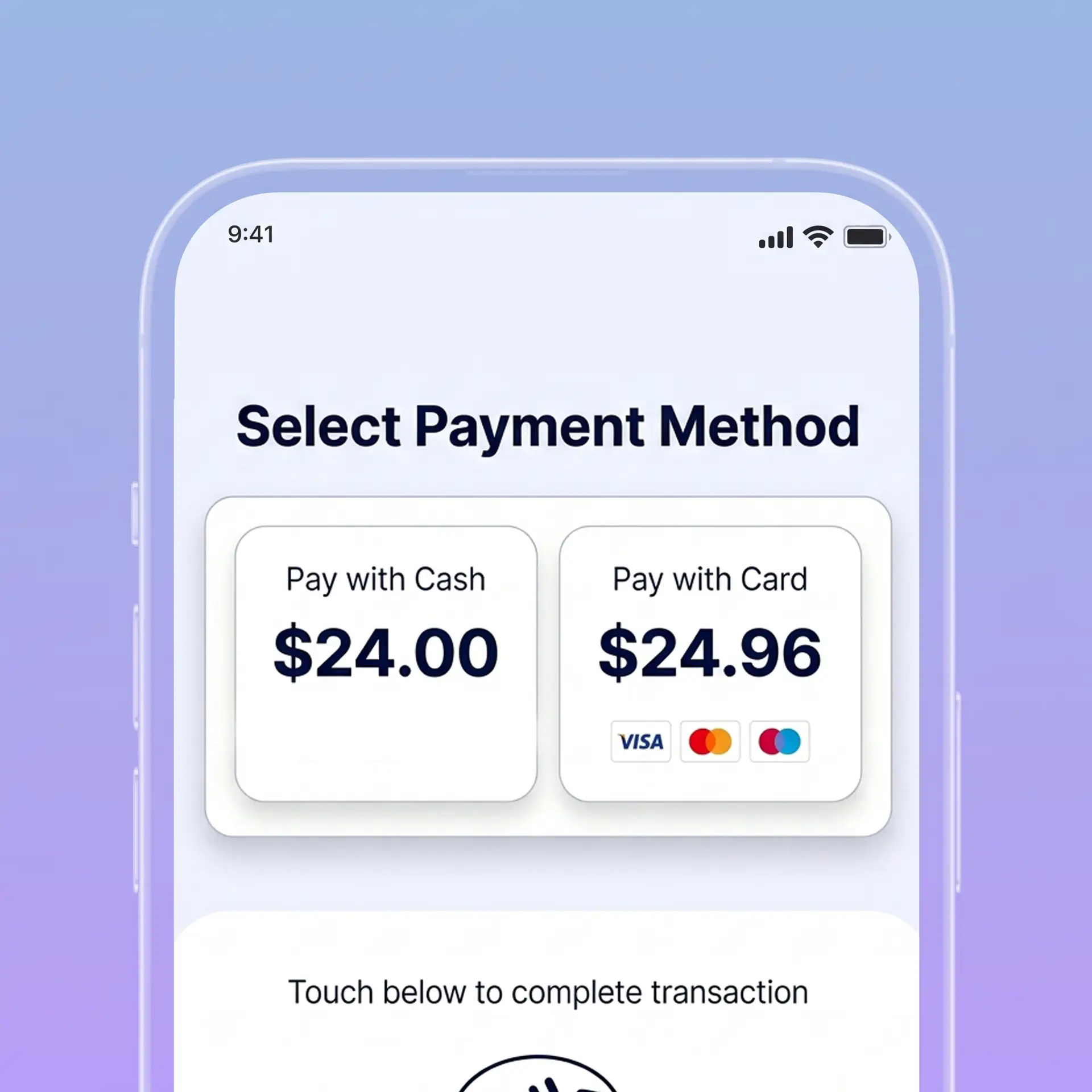
PAYMENT OPTIONS
CASH
$24.00
CARD
$24.96
Both prices shown before payment.
ILLUSTRATIVE CUSTOMER-FACING DISPLAY
Works with the terminals you know




Display both prices clearly from the shelf label all the way to the POS and final receipt.

Show both the cash price and card price clearly labeled together on shelves, menus, and price lists.
Give customers full transparency to compare both amounts before they choose how to pay.
Your configured POS applies the displayed price for the selected payment method and produces a matching receipt.
FREEDOM PROCESSING
SAME ITEM · TWO POSTED PRICES
CASH PRICE
$24.00
CARD PRICE
$24.96
$0.96 price difference
Both prices are shown before payment. Illustrative item pricing; taxes omitted.
For this illustrative item, the cash price is $24.00 and the card price is $24.96. Both amounts are visible before the customer chooses how to pay.
Illustrative prices and receipt; taxes omitted. Actual prices, tax treatment, fees and card eligibility depend on the approved program setup.
Align your price displays, customer notices, POS settings and receipts before launch.
ON THE SHELF. ON THE MENU.
CASH
$24.00
CARD
$24.96
Choose your payment method before checkout.
Cash and card prices
Label both prices clearly and show the full amount for each payment method before the customer pays.
Consistent price displays
Keep shelves, menus, price lists and supported checkout screens aligned with the approved price pair.
A clear price difference
Example: a $24.00 cash price and $24.96 card price have a $0.96 difference. Taxes are omitted.
Configured POS pricing
The POS selects the appropriate posted price for the payment method and records it on the receipt.
Zero processing fees
Eligible card transactions can be structured with $0 processing fees to your business. Your written quote explains coverage and any separate account or equipment charges.
Location-specific review
We review state requirements, card-brand rules, customer notices, card eligibility and your supported equipment before activation.
Use a supported POS system to present the cash and card prices clearly, apply the selected price and issue an accurate receipt. Available features depend on your approved setup.
Countertop checkout
Contactless cards
Credit & debit
Digital wallets
Tableside payments
Cash & card displays
Matching POS totals
Clear payment receipts
We review the full journey—from your shelf or menu to the final receipt—so the displayed cash and card prices match the way your POS charges customers.
FREEDOM PROCESSING
✓
Price display checked
✓
POS amount checked
✓
Receipt checked
We confirm your location, sales channels, price displays and POS compatibility, then explain the proposed pricing and account terms.
We align cash and card prices, customer notices and supported POS settings so the correct total is shown before payment.
We walk through both payment methods, compare each total with its posted price and review the resulting receipts before launch.
FREEDOM PROCESSING
✓
Cash price displayed
✓
Card price displayed
✓
Selected price charged
What is Dual Pricing?
Dual Pricing displays a cash price and a full card price for the same item or service before checkout. Customers choose their payment method and pay the corresponding displayed price.
Can I use my current POS system?
Possibly. We check whether your hardware and software support the required price displays, payment-method selection and receipt format before recommending equipment.
How does it differ from your Cash Discount Program?
Our Dual Pricing Program displays separate cash and card prices before checkout. Our Cash Discount Program starts with one regular displayed price and applies an itemized discount at the register when the customer pays cash. We help you choose a setup that fits your business.
Is Dual Pricing a card surcharge?
In the Dual Pricing setup described here, the full cash and card prices are shown in advance and the selected posted price is charged. Adding a fee above a displayed price can be treated as a surcharge and brings different requirements. Debit and prepaid cards cannot be surcharged; their treatment must be reviewed as part of your approved configuration.
What should I review in the program quote?
Review the proposed cash and card prices, processing-cost coverage, account fees, equipment costs, card eligibility, sales-channel support and contract terms. Ask which charges are included and which remain separate.
YOUR NEXT STEP
Share your current pricing and POS setup. We’ll review both price paths, explain program coverage, and prepare a written quote for your business.